Oct 21, 2026Buying Guides
Automatic Pet Feeder Jam: 7 Causes, Fixes and Bulk-Buy Checks
Seven common causes of automatic pet feeder jams, practical fixes, and the checks B2B buyers should run before placing their next bulk order.
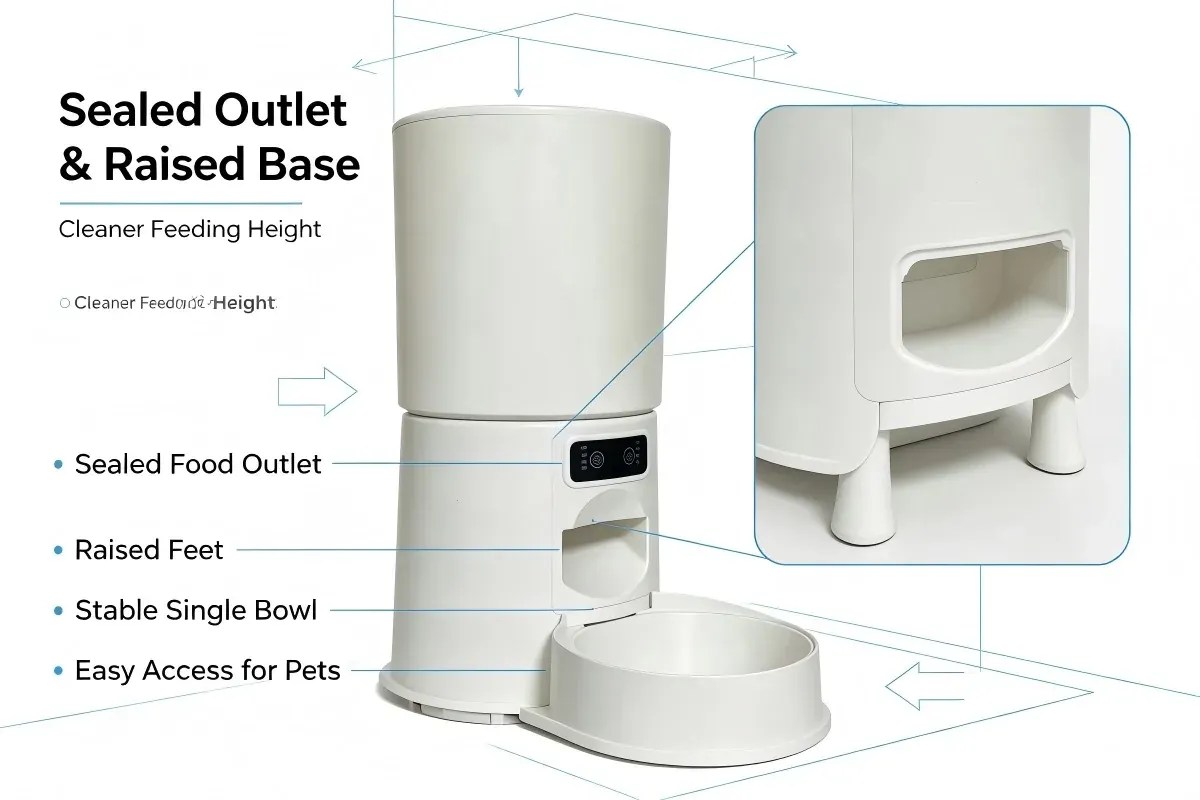
An automatic pet feeder jam is rarely a single defect. In most cases, it is a mismatch between the kibble, the hopper load, the outlet geometry and the way the unit is powered and maintained. For a distributor or private-label buyer, that matters because a jam is not only a support ticket. It is a return, a negative review and a reason for a retail buyer to delist the SKU.
This guide covers seven causes we see in feeder design and field use, the fix for each, and the checks to run before a bulk order. It applies to dry kibble feeders, including button-control and WiFi models.
What Causes an Automatic Pet Feeder Jam
Most feeders move kibble from a hopper through a rotating outlet or auger into a bowl. The path is simple, but every step has a tolerance: kibble diameter, hopper angle, outlet clearance, motor torque and bowl position. When one tolerance is exceeded, kibble bridges, wedges or stalls the mechanism.
A jam can also be a user-error pattern that looks like a product fault: an overfilled hopper, a bowl pushed out of line, or a unit that has not been cleaned. The seven causes below run from the most common specification issue to the most common maintenance issue.
The 7 Causes at a Glance
• Cause — Typical symptom — Immediate fix — Buyer check
• Kibble outside 3–18 mm — Bridging, crushed pieces, empty bowl — Switch to dry kibble in range — Sample test with the buyer's kibble
• Overfilled hopper — Auger stalls, uneven portions — Fill to the marked level — Visible fill line and lid fit
• Moisture — Clumping, odor — Dry the hopper, use fresh food — Lid seal and storage advice
• Misaligned outlet or bowl — Kibble misses the bowl — Reseat the bowl, level the unit — Bowl seating and chute access
• Undersized motor or gear — Stalls on dense kibble, noise — Use correct kibble, service the unit — Motor and gear specification
• Battery mode limits — Unit stops when backup is depleted — Restore mains power, fit fresh cells — Backup runtime and battery inclusion
• Irregular cleaning — Slow feed, residue, odor — Clean hopper, chute and bowl — Tool-free access and cleaning guide
1. Kibble Size Outside 3–18 mm
The supported range is dry kibble from 3 mm to 18 mm. Below 3 mm, small pieces can fall through gaps or pack into the outlet. Above 18 mm, pieces can wedge in the chute. The result is a partial portion, a stalled cycle or a bowl that fills unevenly.
Kibble shape matters as much as diameter. Flat, irregular or very hard pieces can bridge even when the measured size is in range. Buyers should test with the exact kibble their market sells, not a generic sample supplied with the unit.
2. Overfilled Hopper
Hopper capacity is not a target fill line. Overfilling compresses kibble at the outlet, increases load on the motor and can distort the lid seal. The feeder may still run, but portions become inconsistent and the next cycle is more likely to stall.
Fix: fill to the marked line, leave headspace, and check that the lid closes without force. At the buying stage, confirm the fill line is visible and that the hopper can be removed for cleaning.
3. Moisture and Humidity
Feeders are designed for dry kibble. Humidity, condensation or a water bowl placed too close can make kibble clump. Clumps bridge at the outlet and stall the mechanism.
Fix: store food in a sealed container, keep the feeder away from sinks and pet bowls, and clean and dry the hopper after washing. In humid markets, ask what lid seal and desiccant provision the model uses. Do not assume every feeder is sealed to the same level.
4. Misaligned Outlet or Bowl
A bowl that is not fully seated, a unit placed on an uneven floor or a chute knocked during cleaning can send kibble outside the bowl. Users often report this as a jam, but the mechanism may be working correctly.
Fix: reseat the bowl, level the unit and check the chute for cracks. For buyers, look at how the bowl locates. A simple lip is easier to misalign than a keyed seat. Test this in the sample, not only on the specification sheet.
5. Undersized Motor or Gear Design
Motor and gear selection determines how much resistance a feeder can overcome. A motor that is adequate for small kibble can stall on dense, large kibble or on a partially blocked outlet. A low-quality gear train can wear or slip even when the motor is correctly sized. The symptom is a hum, a click or a cycle that stops midway.
Fix: match the feeder to the kibble and avoid forcing a stalled unit. Buyers should ask for the motor and gear specification, the intended duty cycle and the stall protection method. A supplier that cannot describe these is a supply risk, regardless of how the sample performs.
6. Battery Mode Limits
Battery backup is for power interruptions, not daily operation. On the models in this range, three D-size alkaline batteries provide about six hours of emergency power, and batteries are not included. A feeder expected to run for days on cells is the wrong product.
Fix: restore mains power, fit fresh alkaline cells and test the cycle. For retail buyers, unclear battery messaging creates avoidable returns. Put runtime, battery type and the fact that cells are not included on the box and in the manual.
7. Irregular Cleaning
Kibble dust, oil and small pieces accumulate in the hopper, chute and bowl. Over time they reduce flow and can cause odor. A feeder that is difficult to disassemble will be cleaned less often.
Fix: empty and clean the hopper, chute and bowl on a routine schedule, then dry all parts before refilling. Check whether the hopper and bowl can be removed without tools, and whether the manual includes a cleaning schedule. Our existing cleaning guide covers the steps.
What B2B Buyers Should Check Before a Bulk Order
Use the sample to test the specification, not just the unboxing. The checklist below is written for a distributor or private-label buyer preparing a first or repeat order.
• [ ] Kibble test: run the sample with the exact kibble sold in the target market, within 3–18 mm.
• [ ] Fill line: visible, with enough headspace to avoid compression.
• [ ] Outlet geometry: no sharp edges or narrow throat that traps large kibble.
• [ ] Bowl seating: keyed or clearly marked so staff and customers cannot misalign it.
• [ ] Motor and gear: written specification, not only a supplier statement.
• [ ] Portion accuracy: confirm the stated tolerance in writing and test repeated cycles at each setting.
• [ ] Power configuration: USB input, adapter inclusion and battery backup runtime.
• [ ] Cleaning access: hopper, chute and bowl removable, with instructions included.
• [ ] Packaging: drop-test protocol or report, carton quantity and gross weight.
• [ ] Certificates: request the current pack and check model coverage.
• [ ] Spare parts: bowls, motors, gears and adapters available for after-sales.
• [ ] Commercial terms: 100 units per model, OEM 500, ODM 2,000; standard lead time 7–30 days.
Product links for reference: CW-W2510 Button, CW-W2409 Button and CW-W2408 Button. For a wider sourcing framework, see the wholesale buying guide.
FAQ
What kibble size does an automatic feeder accept?
Dry kibble from 3 mm to 18 mm. Wet food, freeze-dried pieces and mixed textures are not supported. Kibble outside the range is the first thing to check when a feeder jams.
Can I run a feeder on batteries every day?
No. Battery backup is an emergency function, about six hours on three D-size alkaline cells. Batteries are not included. Daily operation should use the USB power input with a compatible adapter, which is also not included.
Why does the feeder click but not dispense?
Common causes are kibble wedged at the outlet, an overfilled hopper or a stalled motor. Stop the unit, remove the hopper and clear the outlet. If the motor hums without turning, take it out of service rather than forcing another cycle.
How do I test a feeder before a bulk order?
Run a sample with your market's kibble for several days, including a full hopper and a low-hopper cycle. Check portion weight, bowl alignment and cleaning access. Then review the packaging and certificate pack for the exact model.
Conclusion
An automatic pet feeder jam is usually a specification or maintenance issue, not a random fault. Kibble size, fill level, moisture, outlet alignment, motor margin, battery expectations and cleaning discipline account for most cases. For B2B buyers, the fix begins before the purchase order: test the sample with the right kibble, write the motor and portion specifications into the order, and confirm certificate coverage for each model. That approach reduces returns, protects the retail listing and makes after-sales conversations easier.